
Choose ChatGPT Plus or Pro according to the work that your current plan cannot complete reliably. Plus is a sensible starting point for many individual workflows. Pro becomes worth evaluating when a specific model, allowance, or tool limitation repeatedly interrupts useful work.
The current official pages checked for this guide list Plus at $20 per month and three Pro tiers: Pro 100 at $100, Pro 200 at $200, and Pro 500 at $500. Older comparisons that describe Pro as a single $200 plan miss the present tier structure. Confirm checkout details before purchasing.
Contents
- Compare the actual plans
- Diagnose the problem before upgrading
- Calculate the incremental cost
- Match plan choice to your workload
- Understand separate usage systems
- Run a one month evaluation
- Check billing before changing plans
- A worked upgrade decision
- Avoid paying for the wrong access
Quick answer
Choose ChatGPT Plus or Pro according to the work that your current plan cannot complete reliably. Plus is a sensible starting point for many individual workflows. Pro becomes worth evaluating when a specific model, allowance, or tool limitation repeatedly interrupts useful work.
Compare the actual plans
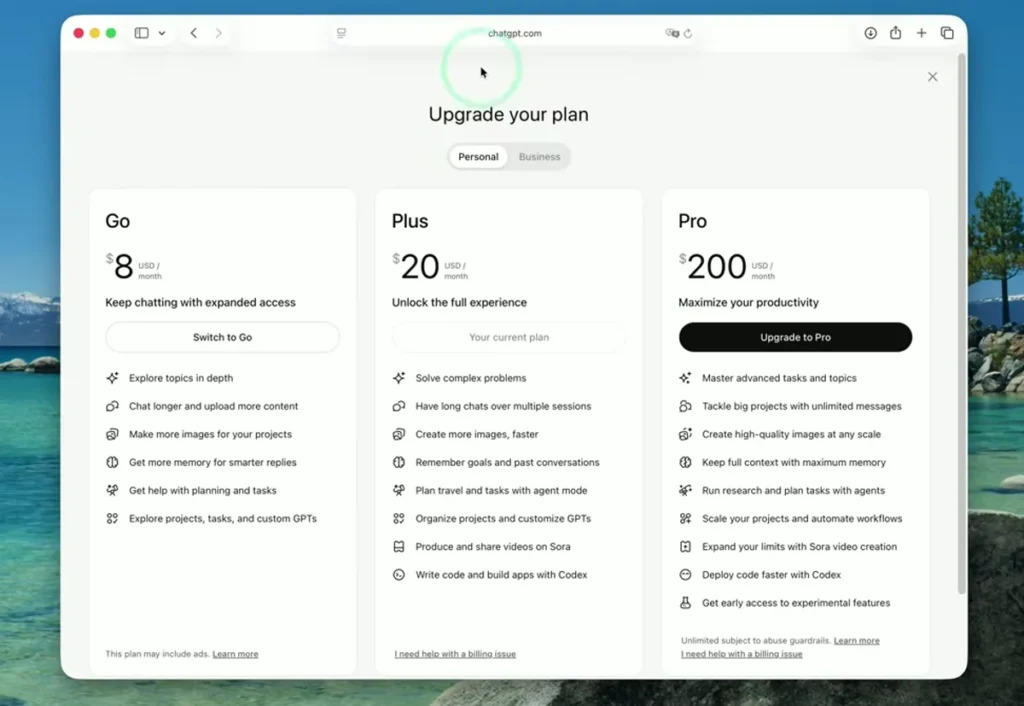
| Plan | Listed monthly USD price | Decision to investigate |
|---|---|---|
| Plus | $20 | Does it cover ordinary individual work |
| Pro 100 | $100 | Does the additional access resolve a recurring bottleneck |
| Pro 200 | $200 | Is the larger allowance useful enough to justify the increase |
| Pro 500 | $500 | Do the highest included usage and eligible Ultrafast access serve a real need |
The official Pro guidance identifies Ultrafast as a Pro 500 feature among Pro plans. Exact model availability and allowances remain account and product details to verify. The table does not imply that spending five times as much produces five times as many useful results.
Diagnose the problem before upgrading
Write down the last three times you could not finish a task. Was the issue a model allowance, tool restriction, file problem, context problem, or weak output?
More allowance may help a quota bottleneck. It will not repair a corrupted file, supply missing evidence, or make an unclear brief precise. A higher subscription also cannot guarantee that a difficult task will succeed.
If your main complaint is poor writing, improve the source material and feedback first. If your main complaint is interruption during long work, record the exact limit messages and how often they occur.
Calculate the incremental cost
Compare the upgrade cost with the value of work it could realistically save after review. Moving from a $20 plan to a $100 plan adds $80 per month before any applicable tax.
In a hypothetical case, someone who values an hour at $20 would need four additional hours of useful monthly savings to cover that difference. This is a budgeting example, not a productivity claim.
Include time spent checking results. If a more capable option reduces both retries and correction, that can matter. If it merely encourages longer outputs that you do not use, it may add little value.
Match plan choice to your workload
A student doing occasional explanations and revision may need less capacity than someone preparing several substantial documents each day. A developer running complex tasks may face different constraints from a marketer drafting short posts.
List your five most common tasks and how often you perform them. Note the tool required, normal review time, and consequence of interruption. Then check the current plan comparison against that list.
Avoid buying a tier for an impressive feature you rarely use. A subscription should support recurring work, not a hypothetical future workload.
Understand separate usage systems
A product can have different allowances for models, Work, Codex, images, or other tools. A message limit and a tool allowance are not necessarily the same restriction.
Read the named limit in the interface. Do not apply a number from an old screenshot to every feature. Faster modes may also consume allowances differently, so speed settings belong in the comparison.
Check whether the work you plan to do uses the chat subscription, an eligible connected allowance, or independently billed API usage. Do not assume that buying Pro funds every external tool that uses an OpenAI model.
Run a one month evaluation
Choose a short test period aligned with the billing terms. Record completed tasks, interruptions, corrections, and time saved. Keep a few examples where the new tier clearly helped and where it did not.
At the end, compare the incremental benefit with the incremental cost. If the upgrade solved no repeated bottleneck, return to the lower tier using the available subscription controls.
For confidential company work, an individual Pro plan may not satisfy your organization’s governance needs. Plan suitability includes the account environment, not just model access.
Check billing before changing plans
Read the upgrade screen for timing, charges, and renewal terms. Do not assume every plan change is prorated in the same way across web and app stores. Save the confirmation.
If you cancel, verify the effective date and billing platform. An app uninstall is not a subscription cancellation.
Upgrade when you can name the limitation, show that it recurs, and explain why the new tier is likely to resolve it. Otherwise, improve the workflow before increasing the monthly bill.
A worked upgrade decision
Suppose Plus handles most of your writing but you encounter a named allowance during two long research sessions each week. Record whether those interruptions prevent completion or merely move work to a later time.
Run a better-scoped version of the task with the sources and expected output prepared in advance. If the bottleneck remains, compare the current higher-tier allowance and price. An upgrade is easier to justify when it solves the same documented problem repeatedly.
If the task still fails after an upgrade because the sources are inaccessible, the plan was not the complete solution. Keep the evaluation focused on accepted outputs and the specific constraint rather than treating a higher price as proof of better fit.
Avoid paying for the wrong access
A colleague’s successful demonstration may use a different workspace, platform, or connected tool. Record the exact environment before assuming your personal subscription will reproduce it.
For a feature essential to your decision, check the official availability and your account’s upgrade screen. If it is rolling out or restricted by an administrator, include that uncertainty in the purchase decision. Do not build an urgent project around access that has not been established.
Related guides: OpenAI ChatGPT Pricing and How to Budget for the Right Plan · ChatGPT Usage Limits and What Each Message Means · ChatGPT Plus Image Generation Limits and How to Plan Around Them
Order on WhatsApp
Get your subscription activated in minutes — pay in AFN with HesabPay, MTN MoMo or at our Kabul office.
💬 Order on WhatsAppFrequently asked questions
Is Pro always more accurate than Plus
No plan guarantees accuracy. Available models and tools can differ, but source verification remains necessary.
Is ChatGPT Pro still only $200
The official page reviewed lists $100, $200, and $500 monthly Pro tiers. Check current pricing when you buy.
Does Pro mean unlimited use of every feature
Do not interpret it that way. Read the conditions and the specific allowance shown for the feature.
Should I upgrade after one limit message
First identify the limit and whether it is likely to affect your normal workload repeatedly.