
For a Claude Code logo, start with current official product or brand materials. Distinguish the Claude brand mark, a wordmark, a product icon, and an unofficial terminal-style illustration. They are not automatically interchangeable.
If you need a recognizable logo for an editorial article, use an authorized asset that matches the product you are discussing. Do not ask an image generator to recreate a brand mark and present the result as an official file.
Contents
- Identify which visual you need
- Use an official source first
- Respect product identity
- Choose the right file format
- Check light and dark backgrounds
- Do not download blindly from logo aggregators
- Use real screenshots for tutorials
- Prepare the asset for publication
- A worked image plan for an article
- Do not infer a design story from the shape
Quick answer
For a Claude Code logo, start with current official product or brand materials. Distinguish the Claude brand mark, a wordmark, a product icon, and an unofficial terminal-style illustration. They are not automatically interchangeable.
Identify which visual you need
| Asset type | Typical purpose | What to verify |
|---|---|---|
| Brand mark | Reference to the broader brand | Official source and usage conditions |
| Wordmark | Name presented in brand typography | Correct spelling, proportions, and current version |
| Product icon | A specific application or product reference | That it identifies Claude Code rather than another surface |
| Terminal illustration | Decorative development visual | Whether it is official or clearly illustrative |
| Screenshot | Demonstration of the actual interface | Current version and removal of private data |
Search results can mix all of these. A file named claude-code-logo.png does not establish its origin or permission for use.
Use an official source first
Check the current product website, published brand resources, and relevant official usage guidance. Save the source page and the date you obtained the file.
If no downloadable asset is clearly supplied for your purpose, use a text reference or a current screenshot where appropriate instead of assuming a third-party download is authorized.
For commercial branding, sponsorship, or integration claims, review the applicable terms carefully. Permission for editorial identification is not the same question as permission to brand your own product.
Respect product identity
Anthropic’s current Claude Code guidance restricts using its names and logos as part of your own product or company identity or in ways that imply an unsupported relationship. Verify the exact conditions for your proposed use.
For a blog comparison, keep the logo subordinate to the article’s explanation. For a plugin or app, avoid a design that makes readers think Anthropic created or endorses it unless you have a documented basis.
This is a sourcing and publishing workflow, not a legal determination about every possible use. Unclear commercial use should be resolved through the rights holder’s guidance or appropriate review.
Choose the right file format
SVG is useful when you have an authorized vector source and need crisp scaling. PNG is useful for raster publishing and transparency. JPEG may be suitable for a photograph or screenshot but is usually inconvenient when a transparent background is required.
Inspect the actual file rather than relying on its extension. Check dimensions, transparency, color, and whether the artwork has been stretched or cropped.
Do not convert a small low-resolution image into a larger file and assume the quality has improved. Find a suitable source asset instead.
Check light and dark backgrounds
Use the approved variant appropriate to the background if the official resources provide one. Keep enough clear space so the mark remains legible.
Avoid adding shadows, gradients, outlines, or altered colors merely to match a website theme unless the usage guidance permits it. A decorative treatment can change the identity of the asset.
Test the image at its final display size. A wordmark readable on a desktop banner may become illegible on a mobile card.
Do not download blindly from logo aggregators
Third-party sites may offer outdated, modified, or poorly sourced files. A transparent download and an SVG label do not establish authenticity.
If you use an aggregator to discover an asset, trace it back to an official source. Avoid downloading executable installers or browser extensions for a simple logo file.
Keep a source note beside the asset so a future publisher can distinguish the approved file from an unverified draft.
Use real screenshots for tutorials
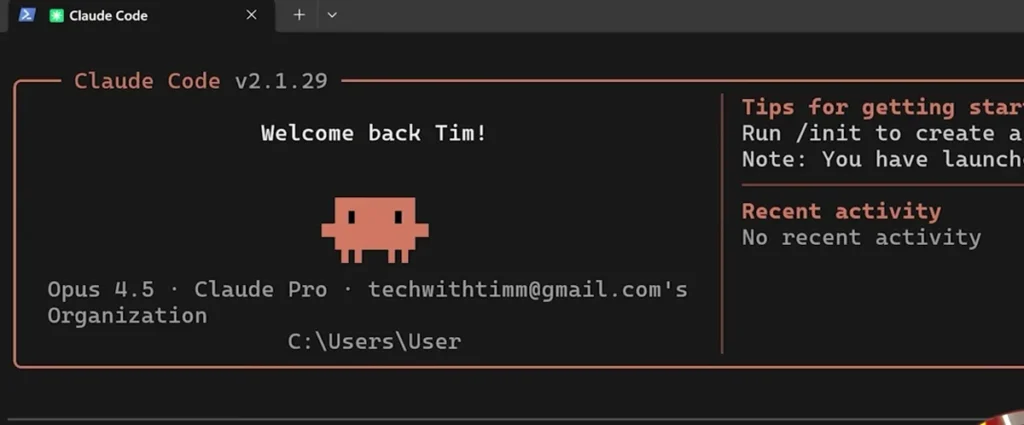
A tutorial should show the actual interface and controls readers need. Capture the relevant screen in a current version, hide secrets and private repository details, and explain the environment in the caption.
Do not use a generated terminal screenshot containing invented commands, paths, or success messages. It can mislead readers into expecting behavior that was never demonstrated.
For a header image, an AI-generated coding illustration can be appropriate when it is clearly decorative and does not reproduce the official logo or claim to show the real interface.
Prepare the asset for publication
Use a descriptive filename, appropriate dimensions, and concise alternative text. If the surrounding text already identifies the brand, avoid unnecessary repetition in the alt text.
Keep the original authorized file and a separate optimized website copy. Record the source, permitted use, and any required attribution in the publisher notes.
If you cannot verify the logo, publish a clean text heading or conceptual illustration while obtaining the correct asset. Accuracy matters more than filling a decorative space.
A worked image plan for an article
Use a current authorized product screenshot for a tutorial step, with a caption naming the platform and review date. Use an approved brand asset only where identification adds value. For the header, a conceptual coding illustration can avoid unnecessary dependence on a logo file.
Keep three separate records: the original source asset, the optimized publishing copy, and the source or permission note. This prevents a later designer from mistaking a recreated draft for the authorized file.
If you change the website background, recheck contrast and clear space. Do not recolor the mark automatically to fit the new palette.
Do not infer a design story from the shape
People may describe a mark as a star, spark, or asterisk. Unless an official source explains its meaning, present those descriptions as visual observations rather than a documented brand philosophy.
Avoid unsupported claims about the exact number of points, hidden symbolism, or why the company chose the design. A logo download article can answer sourcing and file-format questions without inventing a brand history.
Related guides: Claude Code AI and a Practical First Project Workflow · Everything Claude Code and How to Evaluate the ECC Repository · What Claude Cowork Is and How to Use It for Real Work
Order on WhatsApp
Get your subscription activated in minutes — pay in AFN with HesabPay, MTN MoMo or at our Kabul office.
💬 Order on WhatsAppFrequently asked questions
Is every Claude starburst image a Claude Code logo
No. Verify the brand asset and product context rather than inferring identity from a similar shape.
Can AI generate the official logo for me
Use an authorized source for an official mark. A generated imitation is not proof of authenticity.
Which is better SVG or PNG
Use a suitable authorized SVG for scaling or PNG when a raster asset and transparency fit the publishing workflow.
Can I use the mark as my own app icon
Check the applicable official restrictions. Do not imply ownership, endorsement, or partnership without a basis.