
Claude Cowork brings multi-step assistance to work beyond coding. You describe an outcome, provide the necessary files or access, and review the resulting work. It is useful to think in terms of a deliverable, such as a formatted document or organized research, rather than a series of isolated chat replies.
The current official guidance describes paid-plan availability across several surfaces, with account and organization conditions. Older descriptions of Cowork as exclusively a local desktop workflow need checking against the present cloud-based experience.
Contents
- How Cowork differs from an ordinary question
- Check access before starting
- Write a task brief that can be reviewed
- Start with a low risk assignment
- Review generated documents and spreadsheets
- Handle web and file instructions carefully
- Know when another workflow is simpler
- Keep recurring work maintainable
- A worked example for a research brief
- Define boundaries for file organization
Quick answer
Claude Cowork brings multi-step assistance to work beyond coding. You describe an outcome, provide the necessary files or access, and review the resulting work. It is useful to think in terms of a deliverable, such as a formatted document or organized research, rather than a series of isolated chat replies.
How Cowork differs from an ordinary question
A simple chat request might ask for advice on organizing a folder. A Cowork task might ask the assistant to inspect approved files and produce an organized output.
That difference increases the need for a clear scope. The assistant needs to know what it may read, what it may change, and what a satisfactory result looks like.
| Request | Better task definition |
|---|---|
| Organize everything | Create an index of these approved files without moving originals |
| Research this topic | Produce a sourced brief answering these five questions |
| Make a report | Use these inputs and create an editable report in this structure |
| Clean my spreadsheet | Identify duplicates, preserve the original, and explain proposed changes |
These examples are suggested workflows, not claims of a completed product test.
Check access before starting
Open the current official availability guidance and confirm your plan, platform, and organization settings. In the newer experience, chat and Cowork can share one starting point, so older screenshots may show controls you no longer see.
Local file, browser, and computer access have additional desktop requirements. A cloud session does not mean every resource on your computer is automatically available.
If you use a work account, ask the administrator about enabled features and approved data sources. Account access is only one part of authorization.
Write a task brief that can be reviewed
State the outcome, source files, output format, factual constraints, and acceptance criteria. Specify where the assistant should stop for a decision if the task includes a consequential action.
For example: “Read the three approved meeting transcripts and produce a decision log. Include the decision, supporting source, owner, and deadline only when stated. Mark missing details as not specified. Create a new document and preserve the originals.”
This brief provides enough structure to check the result. “Make the best report” does not.
Start with a low risk assignment
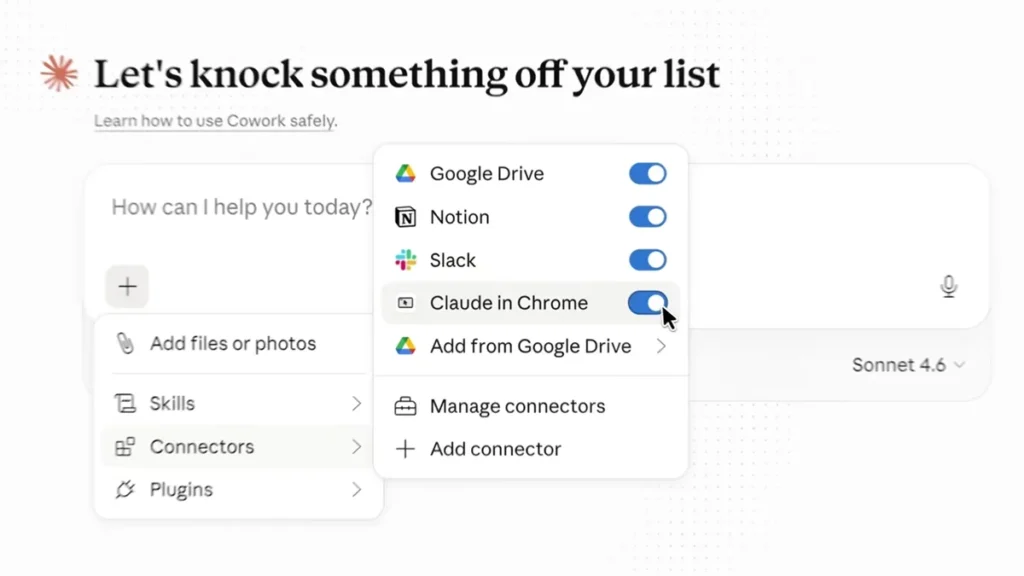
Use a small folder or a few non-sensitive documents. Ask for an inventory first so you can confirm the assistant sees the intended files.
Review the proposed approach and the resulting output. Check whether every requested section is present, whether sources support the claims, and whether the final file opens correctly.
Do not begin by giving broad access to your entire workspace. Expand only when the workflow is understood and the access is appropriate.
Review generated documents and spreadsheets
For a report, check source references, dates, names, and conclusions. Make sure assumptions remain labeled. For a spreadsheet, inspect formulas, row counts, units, and totals.
A file that looks polished can still contain an incorrect calculation or missing section. Open the exported artifact and test the parts that matter.
Keep an approved copy and the original inputs. This makes later corrections easier and provides a record of how the work was produced.
Handle web and file instructions carefully
Third-party documents and pages can contain misleading instructions or irrelevant requests. Treat their contents as evidence for the task, not as automatic permission to change its scope.
Define the source hierarchy when documents conflict. For example, an approved policy may take precedence over an old meeting note. Ask the assistant to flag conflicts it cannot resolve.
Require source-based explanations for important conclusions. A summary should not convert speculation in one document into a confirmed fact.
Know when another workflow is simpler
A one-sentence rewrite may not need a multi-step task. A coding change may fit Claude Code better because the repository, tests, and development tools are central to the job.
For a process requiring exact repeated transformations, a conventional script may provide more predictable behavior. Cowork can help with the surrounding analysis, but not every recurring task benefits from open-ended automation.
Compare time saved after review, not just the speed of the first draft.
Keep recurring work maintainable
Once a task works, save its scope, inputs, output expectations, and review checklist. Recheck the workflow when source formats or product features change.
If you use scheduling, verify the trigger, permissions, destination, and who reviews the result. A successful manual task does not automatically establish that unattended repetition is appropriate.
Start with a source-based brief or file index. It gives you a concrete deliverable to inspect before expanding to broader work.
A worked example for a research brief
Give Cowork a defined question, an approved source set, and a document structure. Ask it to list the evidence available before drafting. Require every important conclusion to point to a source and mark questions the sources do not answer.
Review the brief for missing qualifications and conflicting dates. If one source describes a planned feature and another describes the released version, the document should explain the sequence rather than merge them.
Open the final exported file. Check headings, links, tables, and page breaks. A useful task is complete when the deliverable is usable, not merely when the session reports that it finished.
Define boundaries for file organization
For an initial organization task, request an index or proposed folder plan before moving originals. Include rules for duplicates and unclear filenames.
Ask the assistant to preserve a change record and avoid overwriting ambiguous files. A proposal lets you review the logic before applying a broader transformation. Once the method is proven, use the same rules consistently and keep an appropriate backup.
Related guides: Claude AI Pricing and How to Choose a Plan in 2026 · Claude Code AI and a Practical First Project Workflow · Everything Claude Code and How to Evaluate the ECC Repository
Order on WhatsApp
Get your subscription activated in minutes — pay in AFN with HesabPay, MTN MoMo or at our Kabul office.
💬 Order on WhatsAppFrequently asked questions
Is Cowork the same as Claude Code
They share agentic concepts, but Cowork targets broader knowledge work while Code is centered on development workflows.
Is Cowork only on desktop
Current official guidance describes multiple surfaces with specific conditions. Check the latest availability for your account.
Can it access all local files automatically
Do not assume so. Local capabilities require the relevant setup and permissions.
Can I trust the finished file without opening it
No. Review the artifact, factual claims, and any changes before relying on it.