
Claude Code is a coding agent that can read a project, edit files, run commands, and work with development tools. It is a product for doing development work, not the name of a single model. The official overview describes terminal, IDE, desktop, and browser surfaces.
Start with a small, reproducible task in a project you can inspect. The goal of the first session is a correct, reviewable change, not the largest amount of generated code.
Contents
- Understand what the agent can change
- Install from the current official instructions
- Give the agent a reproducible problem
- Ask for a plan when the task has important choices
- Review the diff rather than the summary alone
- Run meaningful checks
- Keep instructions and context useful
- Finish with a reviewable result
- A worked first session
- Keep command permissions proportional to the task
Quick answer
Claude Code is a coding agent that can read a project, edit files, run commands, and work with development tools. It is a product for doing development work, not the name of a single model. The official overview describes terminal, IDE, desktop, and browser surfaces.
Understand what the agent can change
A coding agent operates in a development environment. Depending on its tools and permissions, it may read files, modify code, install dependencies, or run commands.
Before starting, understand the project’s instructions, repository state, and test process. Keep unrelated work visible so you do not confuse your own changes with the agent’s changes.
| Task type | Good first assignment | Evidence to request |
|---|---|---|
| Bug fix | One reproducible defect | Before and after behavior |
| Small feature | A narrow addition with clear requirements | Changed files and meaningful checks |
| Explanation | Trace one workflow through the code | References to relevant files |
| Refactoring | A limited cleanup with stable behavior | Tests and a focused diff |
Avoid a first request to rebuild an unfamiliar application. A narrow task is easier to evaluate and recover from.
Install from the current official instructions
Use the installation route appropriate to your operating system and surface. Verify the source before running an installer. Do not copy a command from an old article without checking the current documentation.
After installation, verify the version and authentication route. Subscription access, a developer account, and third-party provider access can have different billing arrangements.
Do not put credentials in a prompt or commit them to the project. Use the supported authentication and secret-management methods for the environment.
Give the agent a reproducible problem
Describe the current behavior, expected behavior, steps to reproduce, and relevant constraints. Include an error message or failing example when available.
A useful brief is: “When this form is submitted without an email, the page crashes. It should show a validation message. Reproduce the problem, identify the cause, make a focused fix, and run the relevant checks. Preserve unrelated behavior.”
Tell the agent how to start the application and where meaningful tests live. If you do not know, ask it to investigate and report what it finds before making broad changes.
Ask for a plan when the task has important choices
A short explanation can reveal misunderstandings before files change. It should identify the likely files, proposed behavior, and verification method.
Do not demand a long plan for a trivial edit. Use planning when the implementation has alternatives, dependencies, or a wider effect.
If the agent proposes a new library or a large refactor for a small bug, ask why it is necessary. Extra code increases the review and maintenance burden.
Review the diff rather than the summary alone
Read the changed files. Check that the fix addresses the reported issue and does not alter unrelated functionality.
Look for deleted validation, hard-coded secrets, overly broad permissions, unnecessary dependencies, and silent changes to configuration. A confident summary is not evidence that these problems are absent.
For a generated interface, run it and inspect the affected flow. For a data transformation, use representative inputs and check the output. For an API change, verify the contract and failure behavior.
Run meaningful checks
Use the project’s relevant tests, type checks, linting, or build steps. Record what actually ran and what failed. Do not describe unexecuted checks as passed.
A test that merely repeats the implementation may miss the original bug. Include the trigger that caused the problem and an ordinary case that should continue working.
If the environment prevents a check, state the limitation and perform the independent checks that remain possible. Do not hide a missing runtime test behind a successful syntax check.
Keep instructions and context useful
Explain project conventions, key commands, and architectural constraints in the supported instruction files. Keep them factual and current.
Do not paste an entire unrelated conversation into every session. Supply the files and decisions needed for the task, and preserve a concise handover for long work.
Review third-party extensions, hooks, and tool servers before enabling them. Their instructions and code can affect the environment and the agent’s actions.
Finish with a reviewable result
Ask for a concise summary of behavior changed, files touched, checks run, and remaining limitations. Keep the diff small enough to understand.
Commit or otherwise preserve the accepted change using your normal development process. For shared projects, follow the repository’s review and release rules.
Try one small bug fix first. A correct change you can explain is a stronger foundation than a large patch you cannot maintain.
A worked first session
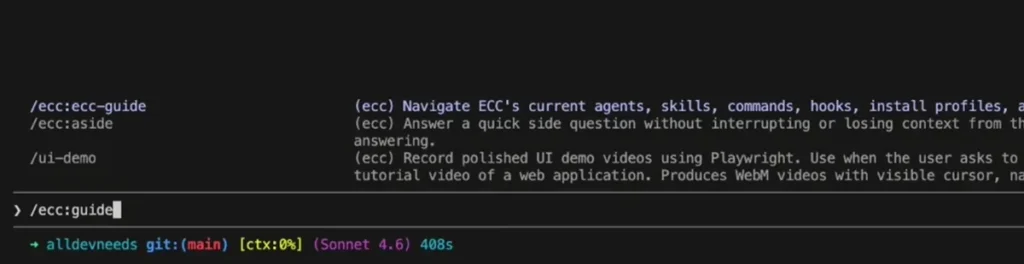
Start from a known repository state and reproduce one bug. Ask the agent to inspect the relevant code and explain the cause using file references. Then review the proposed behavior change before it edits broadly.
After the fix, inspect the diff, run the relevant check, and try the original trigger manually if practical. Check an ordinary case as well. A form validation fix should not break a valid submission.
If the agent cannot reproduce the issue, have it state what evidence is missing. Guessing at a fix can create a larger problem than the original report.
Keep command permissions proportional to the task
Reading source files, editing a local component, publishing a release, and changing production data have different consequences. Understand what the environment permits and keep the task’s authority clear.
Do not disable safeguards simply because a prompt or third-party guide says it will make the agent faster. Use the supported controls and project rules. Review commands that install software, change shared infrastructure, or expose data outside the project.
Related guides: What Claude Cowork Is and How to Use It for Real Work · Everything Claude Code and How to Evaluate the ECC Repository · Claude Opus vs Sonnet for Coding Research and Everyday Work
Order on WhatsApp
Get your subscription activated in minutes — pay in AFN with HesabPay, MTN MoMo or at our Kabul office.
💬 Order on WhatsAppFrequently asked questions
Is Claude Code a model
No. It is a coding product that uses models within a development workflow.
Can it edit several files
The official overview describes work across files and tools. Scope and permissions still need review.
Do I need to know how to code
You need enough understanding to evaluate the result or access to a reviewer who does.
Does passing tests mean the change is perfect
No. Tests provide evidence for covered behavior. Review requirements, edge cases, and the actual diff as well.