
Choose a Claude plan by matching current access, allowances, and billing terms to the work you need to do. Separate personal subscriptions, organization plans, and developer usage before comparing prices.
The official pricing page reviewed November 5, 2026, lists Free, Pro, Max, and Ultra for individuals. Older guides describing only Pro and two Max tiers should be checked against the current page rather than copied into a new budget.
Contents
- Current individual prices to verify at checkout
- Start with the work you repeat
- Understand usage before comparing tiers
- Check Code and Cowork access separately
- Do not assume API billing is identical across plans
- Compare monthly and annual commitments
- Consider organization requirements
- Evaluate the upgrade with a short pilot
- A worked plan evaluation
- Keep personal and organization spending distinct
Quick answer
Choose a Claude plan by matching current access, allowances, and billing terms to the work you need to do. Separate personal subscriptions, organization plans, and developer usage before comparing prices.
Current individual prices to verify at checkout
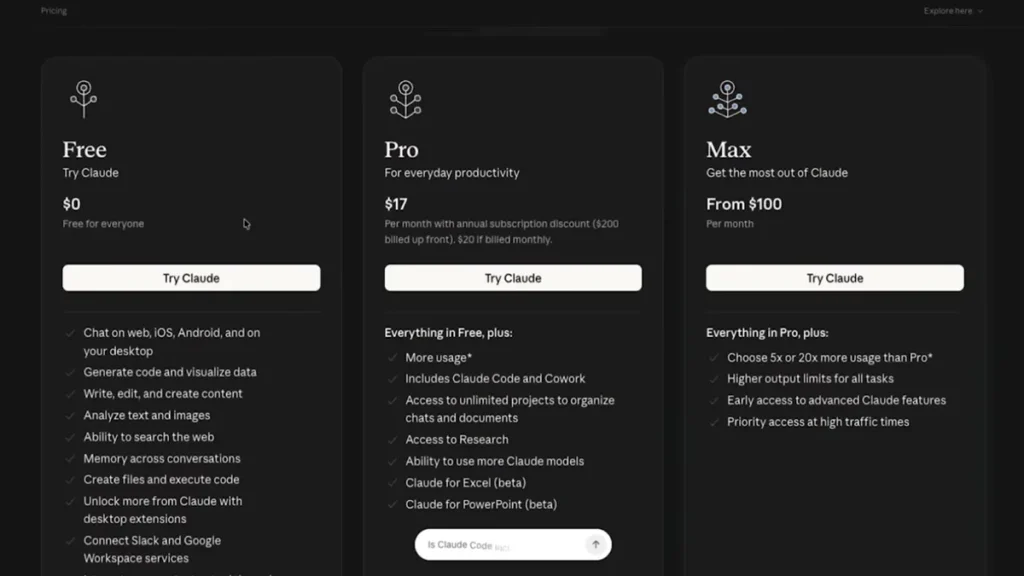
| Plan | Price shown in the reviewed official page | Budget distinction |
|---|---|---|
| Free | $0 | Limited access for evaluation and lighter use |
| Pro | $20 monthly or $200 billed annually | Annual commitment differs from monthly billing |
| Max | $100 monthly | Higher usage than Pro under current terms |
| Ultra | $200 monthly | Different allowance structure and conditions |
The annual Pro total works out to about $16.67 per month; the page rounds the displayed monthly equivalent to $17. Prices exclude applicable tax and can change.
Start with the work you repeat
List your main tasks: drafting, research, document creation, coding, or multi-step work. Note the tools needed and where your current access falls short.
A larger allowance can help when a repeated restriction interrupts useful work. It does not automatically fix unclear prompts, missing evidence, or output that requires careful editing.
If you have not identified a paid requirement, use the available free access to test representative tasks first. A few realistic assignments provide better evidence than a feature list alone.
Understand usage before comparing tiers
Check the current plan comparison and the notices in your account. Model choice, conversation length, and file size can affect how quickly access is consumed.
Do not translate a usage multiplier into a guaranteed number of messages or finished documents. A short question and a long task with several files are different workloads.
Record the restrictions you actually encounter during a normal week. Include the time lost and whether an available alternative could finish the task adequately.
Check Code and Cowork access separately
The reviewed page includes Claude Code among paid-plan capabilities. Cowork also has its own availability guidance and can differ by surface or organization setting.
If you need local files, a particular operating system, or an enterprise integration, verify those requirements directly. Paying for a plan does not establish that every workflow shown in a video is available on your device.
Use a small test assignment before committing a major project. Check not just the assistant’s response but the resulting files, changes, and review effort.
Do not assume API billing is identical across plans
The current pricing page includes conditional API-credit benefits on some higher individual tiers. Read the benefit’s specific terms, eligibility, and expiry before treating it as a general developer budget.
Ordinary usage-based developer billing remains a separate cost model to understand. A monthly chat price alone does not explain the cost of an automation calling models and tools.
For an API workflow, estimate realistic input, output, frequency, caching, and retries using the current model rates. Measure cost per accepted task after testing.
Compare monthly and annual commitments
Annual billing can reduce the effective monthly cost while requiring more money up front. It also commits you for a longer period under the applicable terms.
For someone evaluating a new workflow, flexibility may matter more than the advertised annual saving. Once usage is stable, compare the total commitment and cancellation conditions.
Save the checkout terms and receipt. Confirm the account, billing platform, currency, renewal date, and any taxes before approving payment.
Consider organization requirements
A team may need centralized administration, access controls, offboarding, and contractual terms. An individual subscription can be unsuitable even if its model access looks sufficient.
Ask the administrator which workspace and plan are approved. Keep confidential files in the permitted environment and check connector permissions before use.
For Enterprise, confirm whether the contract uses seat-plus-usage billing or an older arrangement. Do not apply a consumer price to an organization deployment.
Evaluate the upgrade with a short pilot
Choose three recurring tasks, record the current bottleneck, and define a usable result. Track interruptions, corrections, and completed outputs after the upgrade.
Compare the incremental cost with the additional useful work. If the new tier does not solve the problem you bought it for, review the plan before renewal.
The useful price is the cost of a dependable workflow after checking the outputs. The lowest monthly number and the largest allowance can both be poor choices when they do not fit your work.
A worked plan evaluation
Suppose Pro supports your writing but a few larger tasks interrupt the week. Keep a log identifying the task, named restriction, and time lost. Check whether better preparation or a smaller relevant context resolves the problem.
If it does not, compare the current higher tier against that exact restriction. During the evaluation, count accepted deliverables and review time. Do not assume a higher usage multiplier translates directly into the same increase in completed work.
If a conditional credit benefit is part of the decision, read its separate terms and confirm the account can use it for the intended developer workload. A benefit you cannot apply is not a saving in your budget.
Keep personal and organization spending distinct
If an employer provides a workspace, ask whether the planned work belongs there. Buying a personal plan may duplicate cost while leaving governance requirements unresolved.
For a small business, record who owns the account, who can access files, and how access will be transferred or removed when someone leaves. Subscription price is only one part of maintaining a dependable workflow.
Related guides: Claude Enterprise Pricing and a Budget You Can Audit · What Claude Cowork Is and How to Use It for Real Work · Claude Opus vs Sonnet for Coding Research and Everyday Work
Order on WhatsApp
Get your subscription activated in minutes — pay in AFN with HesabPay, MTN MoMo or at our Kabul office.
💬 Order on WhatsAppFrequently asked questions
Is Claude free
The current pricing page includes a Free plan. Check its available tools and limits for your account.
How much is Claude Pro
The reviewed page lists $20 monthly or $200 paid annually, before applicable tax.
Is the $200 individual plan still called Max
The current page reviewed calls it Ultra. Confirm current naming and terms at checkout.
Does a higher plan guarantee better results
No. Model access and allowances are only part of the workflow; evidence, instructions, and review still matter.