
Choose a ChatGPT plan by matching its current access and allowances to your workload. Separate an individual subscription, an organization workspace, and API billing before comparing prices. They solve different purchasing needs.
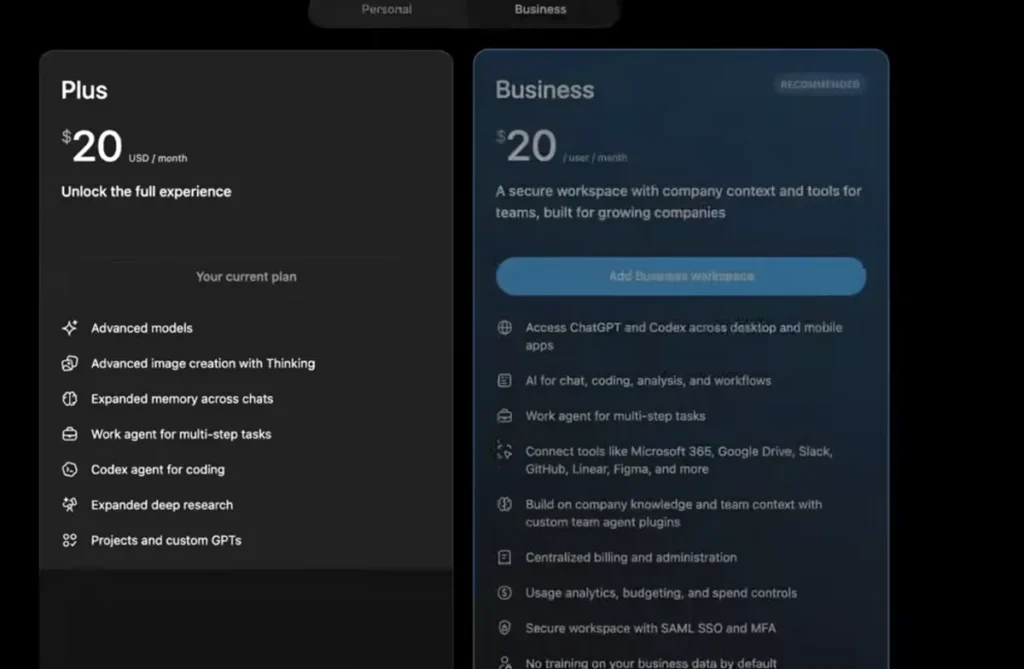
On the official pages reviewed November 5, 2026, Plus is $20 per month and Pro has $100, $200, and $500 monthly tiers. Confirm the live checkout for your account, billing platform, taxes, currency, and available plans before purchase.
Contents
- A practical pricing map
- Compare the full annual commitment
- Keep ChatGPT subscriptions separate from API spending
- Pick a plan using a workload list
- Understand allowances before buying
- Evaluate the cost per useful result
- Check billing and renewal details
- A worked budget for a solo operator
- Avoid duplicate purchases
Quick answer
Choose a ChatGPT plan by matching its current access and allowances to your workload. Separate an individual subscription, an organization workspace, and API billing before comparing prices. They solve different purchasing needs.
A practical pricing map
| Buying route | What you are evaluating | Key budget question |
|---|---|---|
| Free | Access without a paid subscription | Are the available tools sufficient |
| Go where offered | A lower paid individual option | Does the live offer address your specific constraint |
| Plus | Broader individual access | Does it support your regular workload |
| Pro tiers | Additional models or allowances | Does the incremental benefit justify the increase |
| Business or Enterprise | Organization access and governance | What are the seat, usage, and administration requirements |
| API | Developer usage under separate billing | What does each completed task cost |
Do not fill a budget from an old chart. Prices and bundles can change, and the account’s checkout is the relevant place to confirm the transaction.
Compare the full annual commitment
A monthly price and an annual contract are different commitments. Multiply recurring charges by the billing periods you expect to pay and include applicable taxes or store pricing.
For example, twelve months at a hypothetical $20 monthly price totals $240 before tax. This arithmetic does not establish that an annual subscription with those terms is offered.
For a business, count the people who need access and the roles they need. Include onboarding, administration, and output review. Buying seats that remain unused increases the effective cost per active worker.
Keep ChatGPT subscriptions separate from API spending
A chat subscription is not a general balance for every application using OpenAI technology. API usage has its own billing arrangements. Some eligible integrations can use particular included allowances, but that does not mean all external software is covered.
If you are building an automation, identify which account is charged for model requests, tools, storage, and any third-party platform. A small monthly app fee can sit beside a separate variable model bill.
Ask for a cost example using realistic input length, output length, frequency, and retries. A per-token price alone does not show the cost of a completed workflow.
Pick a plan using a workload list
Write down your five most common tasks. For each, note the required tool, frequency, normal review effort, and what happens when access is interrupted.
Start with the lowest-cost option that can meet those needs. Upgrade when you can name a recurring bottleneck and verify that the next plan addresses it.
Do not assume that poor results always require a higher tier. Missing source material, unclear instructions, and unsuitable input files can cause problems on any plan.
Understand allowances before buying
Models and tools can have different restrictions. A plan description using broad language such as more access should be read alongside the current feature comparison and relevant limit notices.
Check how long-running work, images, file analysis, and coding tasks consume allowances in the workflow you intend to use. Do not translate a higher allowance into a guaranteed number of completed tasks.
If a tutorial claims unlimited use, inspect the official conditions and safeguards. The practical question is whether your intended workload is supported under the current terms.
Evaluate the cost per useful result
Track completed outputs you actually use: accepted documents, reviewed code changes, approved images, or resolved research questions. Include time spent correcting errors.
A lower plan can be good value if it handles most tasks without interruption. A higher tier can be worthwhile if it reliably removes expensive delays. Neither conclusion follows from price alone.
Use a short evaluation period and record concrete examples. Avoid keeping a subscription solely because you might need an advanced feature someday.
Check billing and renewal details
Confirm the account before paying. Save the receipt, billing platform, renewal date, and cancellation route. If you purchase through a store, manage the subscription through that store’s controls.
For organizations, record who owns billing and who can change the plan. Personal and workspace purchases should not become mixed simply because the same person uses both.
When comparing a promotional price, include the normal renewal price and the claim deadline. A temporary discount can change the first payment without changing the long-term cost.
A worked budget for a solo operator
Suppose you use an assistant for customer replies, product descriptions, and occasional research. List how often each task occurs and whether the current plan completes it without interruption.
Compare the monthly subscription with the value of the accepted work after checking it. If the tool saves time on routine replies but still requires careful research review, count both effects. Do not treat every generated word as a productive result.
Keep developer automations on a separate budget line. A subscription for manual work and a workflow that calls an API can create two bills even when both involve the same model provider.
Avoid duplicate purchases
Before upgrading, check whether another account or app store already bills you. Confirm which workspace and sign-in method you intend to use.
After changing plans, save the confirmation and verify the active entitlement. If the account still shows unexpected access, investigate the account and purchase route before buying again. Duplicate subscriptions can hide inside different payment channels and make later cancellation more confusing.
Related guides: ChatGPT Plus vs Pro and When an Upgrade Makes Sense · ChatGPT Free Trial Options and What to Check in 2026 · Claude AI Pricing and How to Choose a Plan in 2026
Order on WhatsApp
Get your subscription activated in minutes — pay in AFN with HesabPay, MTN MoMo or at our Kabul office.
💬 Order on WhatsAppFrequently asked questions
Does ChatGPT Plus include API usage
Ordinary API billing is separate. Verify any specific eligible allowance-sharing arrangement independently.
Is Pro a single $200 plan
The current official page reviewed lists three Pro tiers at $100, $200, and $500 per month.
Is the displayed price the final charge
Check currency, taxes, billing period, and purchase channel at checkout.
Which plan is best value
The lowest-cost plan that reliably supports your actual work after review is the useful starting point.