
Copilot and ChatGPT are separate products. Similar technology or similar answers do not make them the same service. They have different accounts, interfaces, tools, billing arrangements, and rules for accessing information.
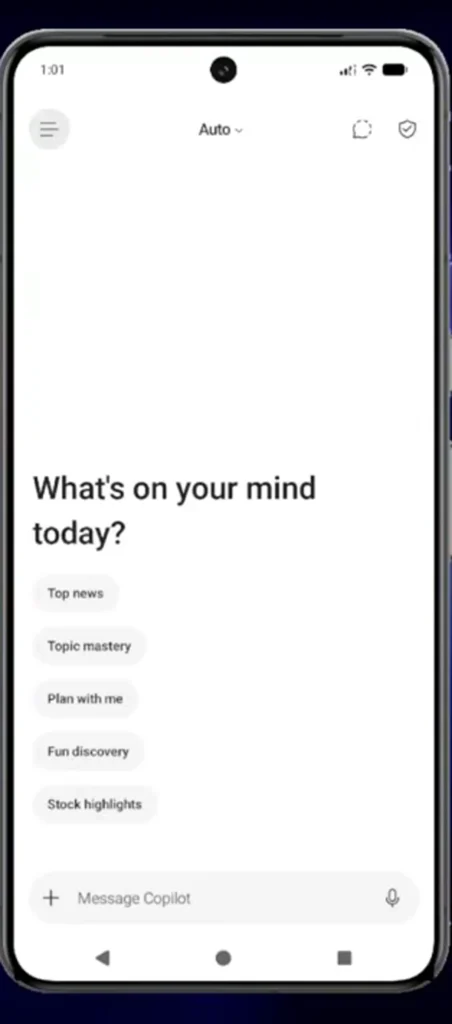
The word Copilot also refers to several products. Before troubleshooting access or comparing subscriptions, identify whether you mean Microsoft’s consumer assistant, a Microsoft 365 work experience, or GitHub Copilot for development.
Contents
- Distinguish the model from the product
- What does Copilot mean in your case
- Why can their answers look similar
- Does a ChatGPT subscription pay for Copilot
- Do the services share my conversations
- Why one product can answer a work question and another cannot
- How to troubleshoot product confusion
- Choose a product by the job it performs
- A worked example of shared technology and different access
- Ask a precise support question
Quick answer
Copilot and ChatGPT are separate products. Similar technology or similar answers do not make them the same service. They have different accounts, interfaces, tools, billing arrangements, and rules for accessing information.
Distinguish the model from the product
A model generates or interprets content. A product combines models with instructions, tools, interface design, retrieval, permissions, and other services.
Two products can use related model technology and still behave differently. They may receive different context, use different search systems, or have different tools available. One can access an approved work document while another sees only what you paste into the conversation.
A useful analogy is two applications using the same database engine. The shared component does not make their accounts, workflows, or subscription entitlements identical.
What does Copilot mean in your case
| Name in the conversation | Clarification to request |
|---|---|
| Copilot | Which Microsoft product and account type |
| Microsoft 365 Copilot | Which license, applications, and work-data access |
| Copilot Chat | Which environment and enabled capabilities |
| GitHub Copilot | Which coding surface and subscription |
| ChatGPT | Which account, plan, model, and tools |
Microsoft’s current overview describes experiences that differ by licensing, integration, and data grounding. Do not assume a basic chat screen includes every work-data capability demonstrated elsewhere.
Why can their answers look similar
General questions often have similar useful answers. Related model families, common public information, and similar prompt patterns can increase that resemblance.
However, resemblance does not prove that one product forwarded your conversation to the other. It also does not prove that they share your history or memory.
For a meaningful test, compare the instructions, source material, and enabled tools. Asking one assistant an isolated question and another a question inside a long project creates different conditions.
Does a ChatGPT subscription pay for Copilot
Do not assume that a paid subscription transfers between separate services. Check each provider’s current billing and entitlement information.
If a company supplies access, ask the administrator what the license includes. If you bought a personal subscription, look at the receipt and account where it is active.
The same principle applies to API billing. Access to a chat product does not automatically pay for every application that uses related models.
Do the services share my conversations
Do not infer data sharing from model relationships. Review each product’s privacy documentation, connected apps, workspace settings, and applicable agreement.
You should also distinguish access from authorization. A work assistant may respect existing permissions, but the underlying files still need sensible access controls. An incorrectly shared document can create a problem even when the assistant follows those permissions.
For sensitive work, use the account approved by your organization. A personal subscription with a familiar logo is not a substitute for an approved workspace.
Why one product can answer a work question and another cannot
Imagine a request to summarize the latest customer meeting. One assistant may retrieve the meeting notes under your work permissions. Another needs you to supply the notes or connect an approved source.
The difference in that task may come from context rather than the model’s ability to write a summary. Test both with the same notes if you want to compare summarization quality.
Then test retrieval separately. Did the assistant locate the right meeting, identify the correct date, and cite the source? These checks help explain where the practical advantage comes from.
How to troubleshoot product confusion
- Record the full product name shown in the interface.
- Check the signed-in account and organization.
- Find the subscription or license details.
- Note the model and tools if the interface identifies them.
- Compare your screen with documentation for that specific product.
If a tutorial uses a different Copilot, its instructions may not apply. Search for the exact product and task rather than trying to force a missing menu to appear.
When asking for help, include the platform and error wording. “Copilot does not work” is less useful than “Microsoft 365 Copilot in this work account cannot find a document I can open directly.”
Choose a product by the job it performs
Once the identity question is clear, evaluate the workflow. Check output quality, data access, export options, review time, and cost.
For a full purchase comparison, test both on the same real tasks. Understanding that the products are separate is the first step; deciding which one serves your work is a different question.
A worked example of shared technology and different access
Suppose two assistants produce similar explanations of a spreadsheet formula. That similarity tells you little about whether they can open your workbook, preserve its formulas, or export a corrected version.
Next, ask each to inspect the same approved workbook. One may have an integrated route to the file; the other may require an upload. Check the final workbook and the cited cell references. The practical difference comes from the complete product workflow, not just the wording of the explanation.
Use this distinction when someone says Copilot is “just ChatGPT.” Ask which layer they mean: model technology, application features, account access, or work-data integration.
Ask a precise support question
Include the product name, sign-in type, application, license where known, and failing action. State whether you can open the source file directly and whether the assistant can find it.
This helps distinguish a permission problem from a missing license, a disabled feature, or a retrieval mistake. It also prevents a helper from sending instructions for a different Copilot product. Remove private document content from any screenshot before sharing it.
Related guides: Copilot vs ChatGPT for Everyday Work in 2026 · AI Similar to ChatGPT and How to Choose an Alternative · OpenAI ChatGPT Pricing and How to Budget for the Right Plan
Order on WhatsApp
Get your subscription activated in minutes — pay in AFN with HesabPay, MTN MoMo or at our Kabul office.
💬 Order on WhatsAppFrequently asked questions
Are Copilot and ChatGPT owned by the same company
They are separate branded services from Microsoft and OpenAI respectively. Product and commercial relationships do not make the accounts interchangeable.
Is GitHub Copilot the same as Microsoft 365 Copilot
No. Identify the coding product separately from the Microsoft 365 work assistant.
Why do both give similar answers
They may draw on related technology or common information. Similar wording alone does not establish shared accounts or conversation history.
Can I follow any Copilot tutorial
Use instructions for the exact product, platform, and account environment you have.