
Cancel your ChatGPT subscription through the platform that bills it. A purchase made on the web is managed in ChatGPT; an Apple or Google Play purchase is managed through that store. Uninstalling the app does not stop renewal.
Before cancelling, find the receipt and confirm the account. The email receiving a receipt and the email used to sign in may differ. Checking both can prevent you from searching for a subscription in the wrong place.
Contents
- Find the billing platform first
- Cancel a subscription purchased on the web
- Cancel a subscription purchased through Apple
- Cancel a subscription purchased through Google Play
- What happens to access and previous charges
- If you cannot sign in
- If you were charged after cancelling
- Verify that the task is finished
- A worked example with two accounts
- Keep a clear cancellation record
Quick answer
Cancel your ChatGPT subscription through the platform that bills it. A purchase made on the web is managed in ChatGPT; an Apple or Google Play purchase is managed through that store. Uninstalling the app does not stop renewal.
Find the billing platform first
| Where you subscribed | Where to manage cancellation |
|---|---|
| ChatGPT website | The signed-in account’s billing settings |
| Apple App Store | Apple account subscriptions |
| Google Play | Google Play subscriptions for the purchasing account |
| Self-service Business workspace | Workspace billing settings with suitable permissions |
| Enterprise or education agreement | Your organization’s administrator or contract contact |
Look at the merchant and subscription information on the receipt. Do not create another paid account while trying to locate the original purchase.
Cancel a subscription purchased on the web
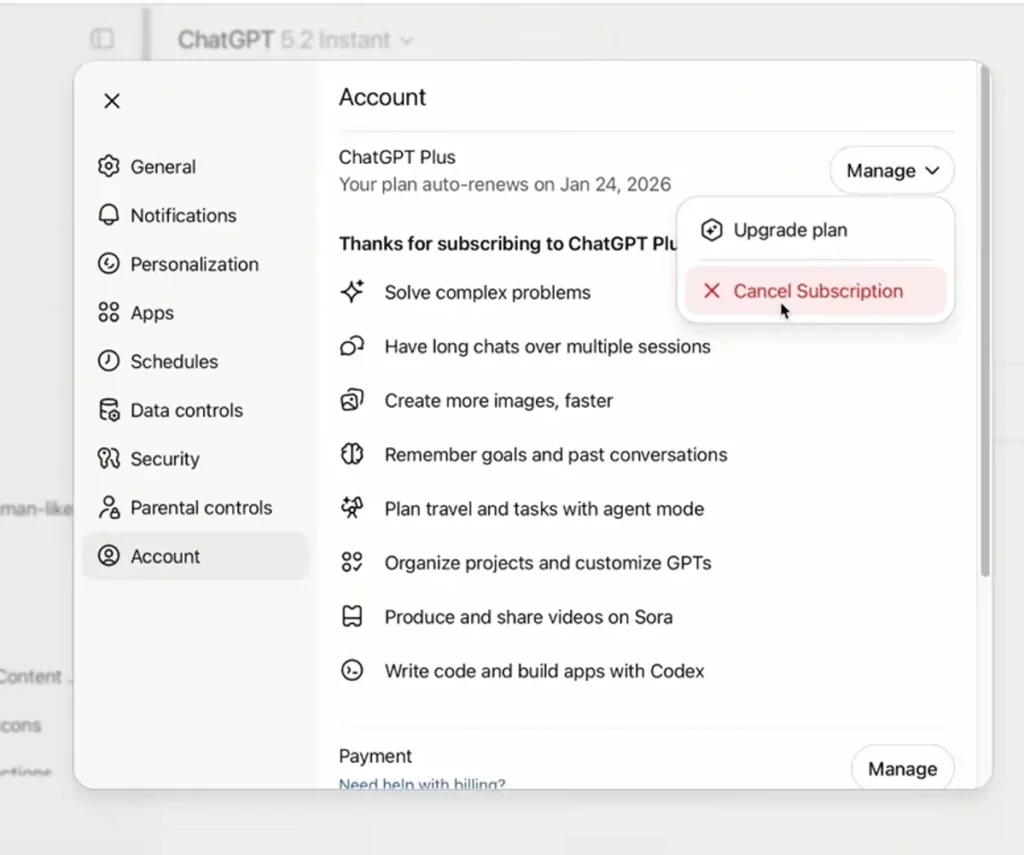
The official instructions reviewed for this guide direct web subscribers to Settings, then Billing, where the Cancel plan control appears. Follow the confirmation flow and check the resulting status.
If the control is missing, verify the signed-in account and try the same account in another browser. A store-billed subscription will not necessarily show the same cancellation controls as a direct web purchase.
Save the confirmation and effective date. A cancellation request is easier to verify when you have the final status rather than only a screenshot of the first button you clicked.
Cancel a subscription purchased through Apple
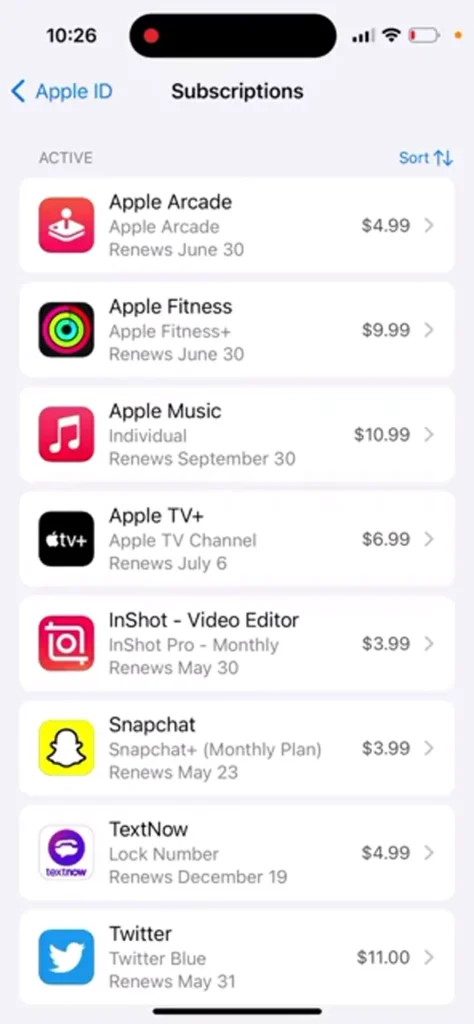
On an iPhone or iPad, open Settings, select your name, open Subscriptions, select ChatGPT, and follow the cancellation flow. Confirm the Apple account matches the one used to buy the subscription.
The official guidance warns that deleting the ChatGPT account does not cancel an Apple subscription. Stop renewal through Apple before deleting the account if you intend to do both.
If an expiration date is shown and no cancellation button appears, review whether the subscription is already cancelled. For store-account recovery or store-billing problems, use Apple’s official support route.
Cancel a subscription purchased through Google Play
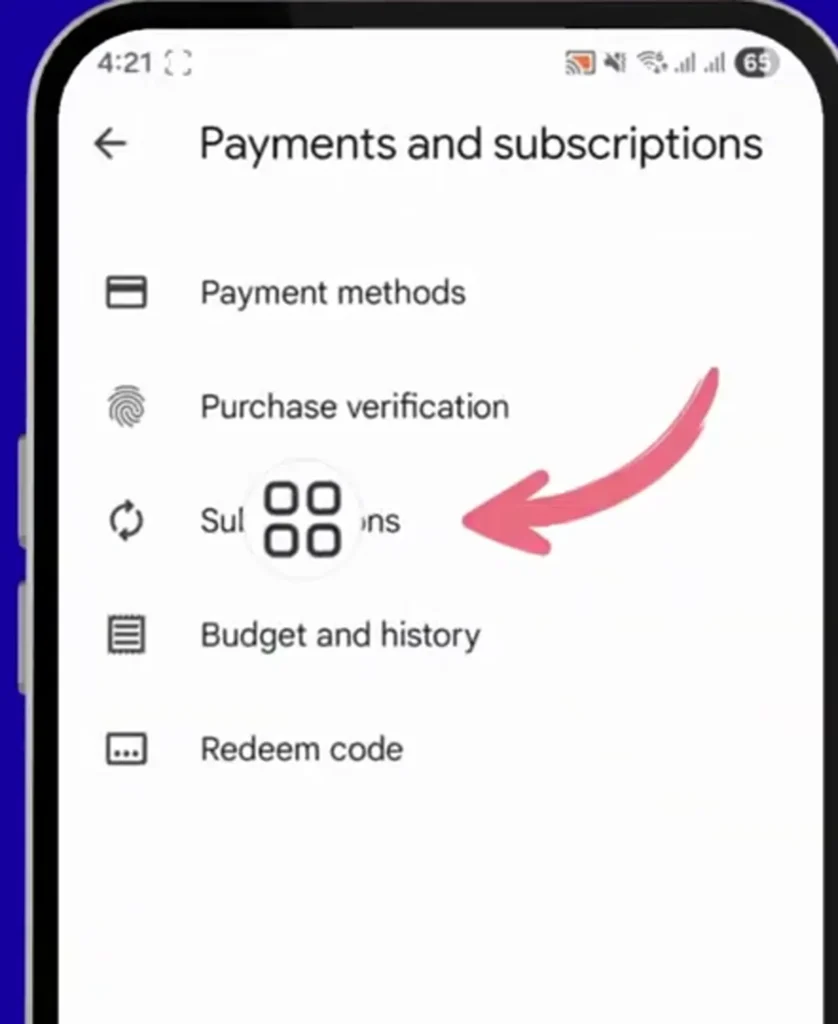
Open the purchasing Google account’s Play subscriptions, select ChatGPT, and follow the cancellation instructions. On a device with several Google accounts, check each relevant purchasing account rather than assuming the active app login controls billing.
The website route also provides subscription management through Google Play. Complete every confirmation screen and keep the resulting status.
Do not assume that deleting the Android app or signing out of ChatGPT changes the store subscription.
What happens to access and previous charges
Cancellation stops future renewal according to the applicable billing terms. It does not automatically refund past charges. Read the effective date displayed in your account or store.
If you want a refund, use the refund process for the purchase channel and explain the charge. A cancellation confirmation and a refund decision are separate records.
For promotional subscriptions, review the offer’s terms as well. The treatment of unused promotional periods can differ from ordinary paid access.
If you cannot sign in
For a direct web subscription, contact official support using the information requested in its current cancellation guidance. Supply enough to identify the purchase, while keeping full payment credentials private.
For a store subscription, use the store account that purchased it. If that account is inaccessible, the store’s account-recovery process may be necessary.
Record the date, charge amount, billing channel, and account identifiers you have. Never send your password, recovery codes, or complete card number to someone offering cancellation help through social media.
If you were charged after cancelling
Compare the charge date with the cancellation’s effective date. Check whether there is another subscription under a different account or billing channel. Also distinguish a pending authorization from a completed charge by checking the payment record.
Collect the receipt, final cancellation confirmation, and relevant dates. Then contact the appropriate billing support. Avoid repeated disputes or new subscriptions before you understand which purchase is involved.
A support request should describe the timeline clearly: purchase, cancellation, effective date, and disputed charge. Include screenshots with private payment details hidden.
Verify that the task is finished
Return to the subscription screen and look for the changed renewal or expiration status. Keep a copy with your records. You do not need to delete your account merely to stop paying.
If you manage a team workspace, confirm the workspace identity and the consequences for members before making an organization-level change. Individual and workspace subscriptions are different billing responsibilities.
A worked example with two accounts
Imagine you signed in on the web with one email but originally purchased through Apple using another sign-in method. The web account may show Free while the Apple subscription remains active. Clicking around the web billing page will not necessarily locate the store purchase.
Start with the receipt. Match the purchasing store account, then identify the ChatGPT account connected to the subscription. Complete cancellation in the store and save the expiration status. Resolve account access separately if you still need the conversation history.
This is why a cancellation checklist begins with billing identity rather than the device currently in your hand.
Keep a clear cancellation record
Save the purchase receipt, cancellation confirmation, effective date, and any support case number together. If a later charge appears, these records help establish the timeline without relying on memory.
For a business, record who authorized the change and which workspace it affected. If staff depend on the subscription, communicate the effective date through your normal internal process. Do not confuse stopping one person’s personal renewal with cancelling an organization’s shared workspace.
Related guides: ChatGPT Free Trial Options and What to Check in 2026 · ChatGPT Plus vs Pro and When an Upgrade Makes Sense · How to Clear ChatGPT History and Manage Saved Data
Order on WhatsApp
Get your subscription activated in minutes — pay in AFN with HesabPay, MTN MoMo or at our Kabul office.
💬 Order on WhatsAppFrequently asked questions
Does uninstalling ChatGPT cancel the subscription
No. Cancel through the purchasing platform.
Does cancellation automatically provide a refund
No. Refund requests follow a separate process and depend on the purchase and applicable terms.
Why is the cancel button missing
Check the account, billing channel, current subscription status, and permissions.
Should I delete my account to stop charges
Use the subscription cancellation route. Account deletion has separate consequences and does not cancel Apple billing.