
“Everything Claude Code” can mean a broad request for Claude Code information or the community configuration project associated with the affaan-m repository. If you mean the project, identify the exact repository and version before installing anything.
During this review, the original everything-claude-code URL redirected to affaan-m/ECC. Repository names, contents, and installation steps can evolve. Use the current maintainer documentation rather than assuming an older tutorial still describes the same package.
Contents
- What a configuration collection can add
- Confirm identity and provenance
- Review the installer before running it
- Start with one component
- Check hooks with particular care
- Keep context and instructions focused
- Use a rollback and update process
- Separate the project from official product guidance
- A worked component evaluation
- Watch for claims that exceed the evidence
Quick answer
“Everything Claude Code” can mean a broad request for Claude Code information or the community configuration project associated with the affaan-m repository. If you mean the project, identify the exact repository and version before installing anything.
What a configuration collection can add
A collection may contain reusable skills, instructions, hooks, memory patterns, or tool configurations. These can help standardize recurring development work, but they can also change how an agent behaves.
Treat the collection as code and configuration to review. Popularity, a large file count, or a creator’s credentials do not establish compatibility with your project.
| Component type | Review question |
|---|---|
| Skill or instruction | When is it applied and what behavior does it request |
| Hook | What command runs and on which event |
| Tool configuration | Which system or service receives access |
| Memory mechanism | What is stored and where |
| Installation script | Which files and settings are modified |
| Update process | How can changes be reviewed and reversed |
These categories form an evaluation checklist. Verify which components the current release actually includes.
Confirm identity and provenance
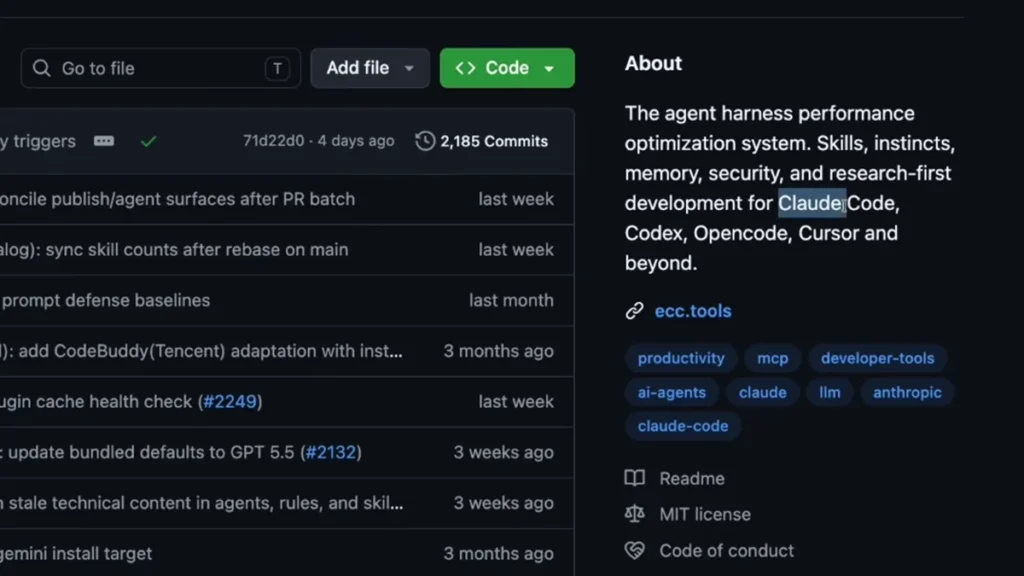
Open the repository directly, inspect the owner, and follow the maintained README. Be careful with forks that have similar names and copied instructions.
Check the license, release notes, recent changes, and issue reports relevant to your environment. A repository can be actively maintained while a particular component remains unsuitable for your workflow.
Record the version or commit you evaluated. “Installed the latest” is difficult to reproduce after the project changes.
Review the installer before running it
Read what the documented installation changes. Identify whether it writes to project files, user-level settings, shell configuration, or shared tool directories.
Keep a copy of existing settings and inspect the diff after installation. Do not overwrite a working configuration without understanding how the new files merge with it.
For scripts, look for downloaded code, network destinations, credential handling, and commands that run automatically. If you cannot evaluate a component, leave it disabled until someone qualified reviews it.
Start with one component
Choose a recurring problem, such as inconsistent review instructions or a missing project checklist. Install or copy only the supported component needed for that problem.
Run a small test in a disposable or isolated project. Compare behavior with and without the component. Record whether it improves the accepted result, reduces review time, or merely adds output.
Avoid enabling an entire collection because the installation takes only one command. Setup convenience is different from a reason to activate every feature.
Check hooks with particular care
Hooks can execute commands in response to events. Review the trigger, command, inputs, outputs, and failure behavior.
Confirm that the syntax matches your installed Claude Code version. A copied configuration may rely on an older event name, matcher format, or command environment.
Test with non-sensitive files and inspect logs. A hook that fails silently can leave you believing a check ran when it did not.
Keep context and instructions focused
Too many overlapping rules can make behavior harder to predict. Check for duplicate instructions, conflicting requirements, and components that do not apply to your language or framework.
Do not assume every performance claim transfers to your project. A configuration tuned for one development stack may add unnecessary work in another.
Measure the result you care about: correct changes, useful tests, manageable diffs, and time spent reviewing. Token counts can be relevant to cost, but they are not the only measure of value.
Use a rollback and update process
Record the files and settings changed, the version installed, and how to disable each component. Test rollback before relying on the configuration for important work.
Review updates as changes to your development environment. Read release notes and inspect relevant differences rather than automatically replacing everything.
If an update breaks a workflow, preserve the error and return to the known version while investigating. Avoid making several unrelated configuration changes at once.
Separate the project from official product guidance
Community configuration can complement Claude Code, but it is not the authority for every product feature or security rule. Use official documentation to verify supported behavior and the maintainer’s documentation to understand the collection.
Begin with the smallest component that solves a specific problem. Expand only after observing a clear benefit in your own project.
A worked component evaluation
Suppose you want a reusable review checklist. Read the component’s instructions, identify when it activates, and compare it with your existing project guidance. Remove or disable conflicting rules in a controlled test configuration rather than allowing both to compete silently.
Run one ordinary change and one change involving an edge case. Check whether the component identifies real issues or merely produces a longer report. Keep the version and outputs so you can compare a later update.
If the component requires hooks or an external tool, evaluate those dependencies as well. A useful instruction file does not automatically justify every surrounding installation step.
Watch for claims that exceed the evidence
A maintainer’s benchmark, anecdote, or preferred workflow can help you form a hypothesis. It does not establish that your project will achieve the same speed, token use, or quality.
Measure the outcome in your own environment and report it narrowly. “This checklist caught a missing error case in our test” is more defensible than “this collection makes every coding agent better.”
Related guides: Claude Code AI and a Practical First Project Workflow · Claude Opus vs Sonnet for Coding Research and Everyday Work · Claude Code Logo Files and How to Choose the Right Asset
Order on WhatsApp
Get your subscription activated in minutes — pay in AFN with HesabPay, MTN MoMo or at our Kabul office.
💬 Order on WhatsAppFrequently asked questions
Is Everything Claude Code the official Claude Code product
It is a community project distinct from Anthropic’s coding product. Confirm the repository owner and documentation.
Why does the old repository URL redirect to ECC
The original URL redirected during this review. Follow the maintained repository and check its history for current naming.
Should I install every component
Only enable components you understand and need. Test them in a controlled project first.
Does popularity prove that a configuration is safe
No. Review the code, permissions, compatibility, and update behavior relevant to your environment.